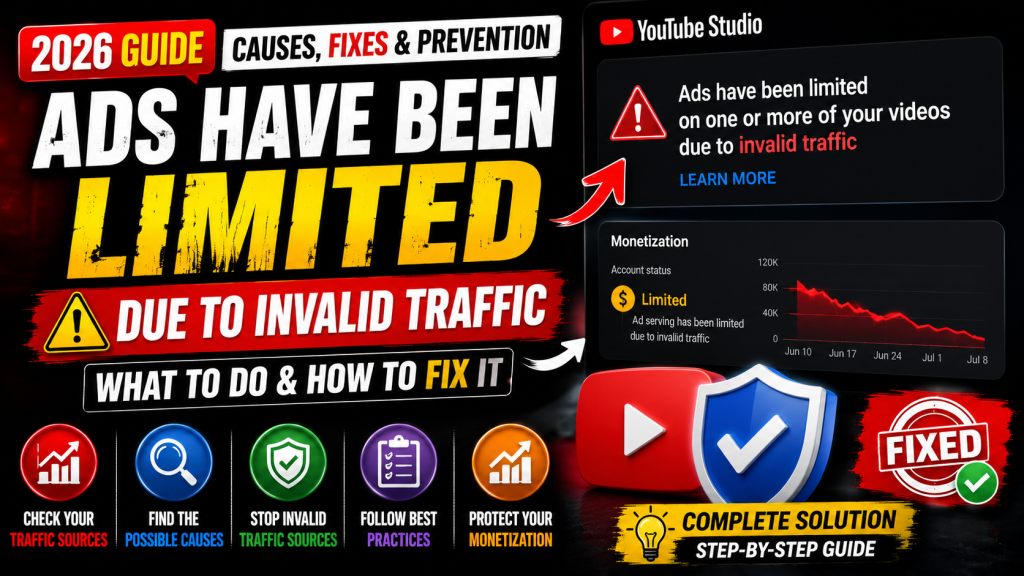
Seeing the message “Ads have been limited on one or more of your videos due to invalid traffic” in YouTube Studio can be alarming for any creator. It often raises concerns about lost revenue, monetization status, and the future of your channel.
In many cases, this notice does not mean your channel has been demonetized or permanently removed from the YouTube Partner Program. Instead, it indicates that Google’s systems detected traffic patterns that may be invalid and temporarily limited ads on some videos while they evaluate the activity.
This guide explains what the warning means, the most common causes, how to respond, and practical steps you can take to reduce the risk of future issues.
What Does “Ads Have Been Limited Due to Invalid Traffic” Mean?
Invalid traffic refers to clicks, views, or other ad interactions that Google’s systems determine may not represent genuine advertiser interest.
When Google detects unusual activity, it may temporarily limit ads on one or more videos to protect advertisers.
This warning does not automatically mean:
- Your YouTube channel is terminated.
- Your monetization has been permanently removed.
- You intentionally violated policies.
Instead, it signals that some traffic requires additional review.
What Can Cause Invalid Traffic?
Google does not publish every signal it uses, but common situations that may contribute include:
- Repeated ad clicks from the same users.
- Artificial traffic generated by bots or automated systems.
- Incentivized views or clicks.
- Traffic purchased from low-quality third-party services.
- Unusual spikes from suspicious sources.
- Repeated self-clicking on ads.
- Invalid traffic patterns identified by Google’s automated systems.
Sometimes creators receive this warning even if they did not intentionally generate invalid traffic.
Does This Mean My Channel Is Demonetized?
Not necessarily.
Ad serving may be limited on certain videos while Google evaluates traffic quality.
Many creators continue to remain in the YouTube Partner Program even after receiving this notification.
However, repeated or serious invalid traffic issues may affect monetization if policy violations are confirmed.
What Should You Do Immediately?
1. Don’t Panic
Receiving this notification doesn’t automatically mean you’ve lost your channel or your monetization.
Avoid making rushed decisions based on rumors.
2. Stop Any Paid Traffic Campaigns (If Applicable)
If you’re promoting videos through advertising or third-party traffic sources, review those campaigns carefully.
Avoid using services that promise guaranteed views, subscribers, or ad clicks.
3. Never Click Your Own Ads
Do not click ads on your own videos out of curiosity or to test whether they’re working.
Repeated self-clicking can contribute to invalid traffic signals.
4. Review Your Traffic Sources
Open YouTube Analytics and examine where your viewers are coming from.
Pay attention to:
- Browse Features
- Suggested Videos
- YouTube Search
- External websites
- Playlists
- Direct traffic
Unexpected or unexplained traffic spikes are worth monitoring.
5. Continue Uploading Normally
Unless YouTube specifically instructs otherwise, continue publishing high-quality content as usual.
Stopping uploads is generally unnecessary.
6. Follow YouTube’s Monetization and Community Guidelines
Review your channel to ensure it complies with:
- YouTube Partner Program policies
- Community Guidelines
- Advertiser-Friendly Content Guidelines
Compliance helps reduce the risk of future enforcement actions.
Can You Appeal the Invalid Traffic Warning?
In some situations, YouTube or Google may provide a way to submit additional information if they request it.
If you’re asked to provide details:
- Explain your traffic sources honestly.
- Describe any unusual activity you observed.
- Include only factual information.
- Avoid speculation or unsupported claims.
Only submit information through official channels when requested.
How Long Does the Limitation Last?
There is no fixed timeline.
The duration depends on Google’s review process and whether traffic quality returns to normal.
Some creators see ad serving return after a relatively short period, while others may wait longer depending on the circumstances.
How to Prevent Invalid Traffic Issues
Follow these best practices:
- Never purchase fake views or subscribers.
- Avoid click-exchange websites.
- Don’t ask viewers to click ads.
- Don’t repeatedly watch your own videos to trigger ads.
- Avoid suspicious traffic services.
- Monitor your analytics regularly.
- Keep your content compliant with YouTube policies.
- Focus on organic growth through valuable content.
Common Myths About Invalid Traffic
Myth: My YouTube channel is permanently banned.
Fact: Ad limits are not the same as channel termination.
Myth: I should delete the affected videos.
Fact: Deleting videos doesn’t necessarily resolve invalid traffic issues and may remove valuable content unnecessarily.
Myth: Uploading more videos removes the warning.
Fact: New uploads alone do not remove invalid traffic limitations. Focus on genuine audience growth and policy compliance.
Myth: Every traffic spike is invalid.
Fact: Viral videos can experience legitimate traffic spikes. Google’s systems evaluate many signals, not just sudden increases in views.
Frequently Asked Questions
Will I lose monetization?
Not automatically. Many creators remain monetized while ads are temporarily limited on certain videos.
Can invalid traffic happen without my knowledge?
Yes. Invalid traffic can result from activity outside your direct control, although Google evaluates many factors before taking action.
Should I contact YouTube Support?
If you’re eligible for Creator Support or receive instructions from YouTube, follow the official support process. Avoid relying on unofficial recovery services or guarantees.
Can I continue uploading videos?
Yes. Unless YouTube specifically tells you otherwise, you can generally continue uploading content that complies with YouTube’s policies.
Final Thoughts
An invalid traffic notification can be concerning, but it isn’t necessarily the end of your monetization journey. The most important step is to focus on genuine, organic audience growth and avoid practices that could generate artificial traffic or ad interactions.
Review your analytics, follow YouTube’s policies, and continue creating valuable content for your viewers. Over time, maintaining high-quality traffic and consistent compliance gives your channel the best chance of long-term success.



Leave a Reply